
Sky Exchange Phone Sign-In Card: Quick Three Fields Above the Tab Bar
7316 On a phone the code beside the Validation box prints smaller than on a laptop, so zoom in once before you copy the four digits.
This card follows the order your thumb meets on Sky Exchange: name, password, code. The ID desk sends the first two in WhatsApp and replaces lost ones the same way. Adults 18+ only.
Phone sign-in
Sky Exchange Mobile Login — Secure Phone Login Steps and Quick Error Fixes
Log in to Sky Exchange from a phone browser or the .apk with one Username, one Password and the 4-digit Validation code. Below sit the mobile screen, the six-tab bottom bar and fixes for codes, resets and blocked addresses.
Sky Exchange Mobile Login Screen on a Phone: The Real Layout
Portrait mode, a working Sky Exchange mirror, and the desktop header bar is gone. Its three fields now sit in a narrow column: Username at the top, Password under it, the Validation box last, with the four-digit code printed just to the right of that box.
Three fields, one code.
Below them you get Login and Demo login, then Download .apk and Contact On WhatsApp, and at the very foot of the screen a short line asks whether you have an account, with Sign Up next to it. On a laptop the same three fields stretch across the top header bar beside Login and Demo, which is probably why people who first used Sky Exchange on a computer assume the phone version version is some other product, when in practice it is the same screen stacked from top to bottom and the same ID opens on both.
That last point matters more than it looks. The Username and Password from the desk work in a phone browser, inside the .apk and on any working mirror address, and the balance follows the ID wherever you sign in.
Phones shrink the two helper links under the Password box to small print. One reads Forgot password?, the other Resend Verification email?, and on a narrow screen they sit close enough to Login that a thumb often hits the wrong one; if a mail-reset form pops up when you meant to sign in to Sky Exchange, go back and tap a little lower.
Once the login goes through, the Sky Exchange mobile lobby appears with a fixed tab bar along the bottom edge (the desktop layout has nothing like it, its sports list runs down the left side instead). The next block goes through that bar one tab at a time.
Sky Exchange Six-Tab Bottom Bar: What Each Live Tab Opens
Six tabs stay pinned to the bottom of the Sky Exchange screen after you sign in on a phone, and they decide where every tap goes. Games sits in the middle as a raised chip, a little taller than its neighbours, so it is the one your thumb finds first.
- Games
- Tap the raised chip in the middle and the Sky Exchange casino rows replace the sports view, Aviator, Teen Patti 20-20, Andar Bahar, Mine Sweeper and Dragon Tiger among them. One figure from the rules before you tap: 1 casino coin equals 100 INR of main balance.
- Sports
- Everything the desktop shows in its left-hand column, poured into one long scroll; cricket sits near the top, with Kabaddi, Politics and GreyHound further down for anyone who goes looking.
- In-Play
- Whatever has already started, nothing scheduled for later. A tap on any listed match shows its back and lay columns next to each other, sized for a phone.
- Home
- The lobby front page. Tap it to get back from any market without hunting for a back arrow.
- Multi Markets
- Your own shortlist. Pin two or three Sky Exchange markets here and a phone stops feeling cramped on a night with overlapping matches, since you scroll one page instead of hopping between tabs.
- Account
- The place to look for your own ID details and the password change; the settings drawer with Default stake, Quick Stakes, Highlight when odds change and Accept Any Odds is close by, though each skin arranges it a little differently.
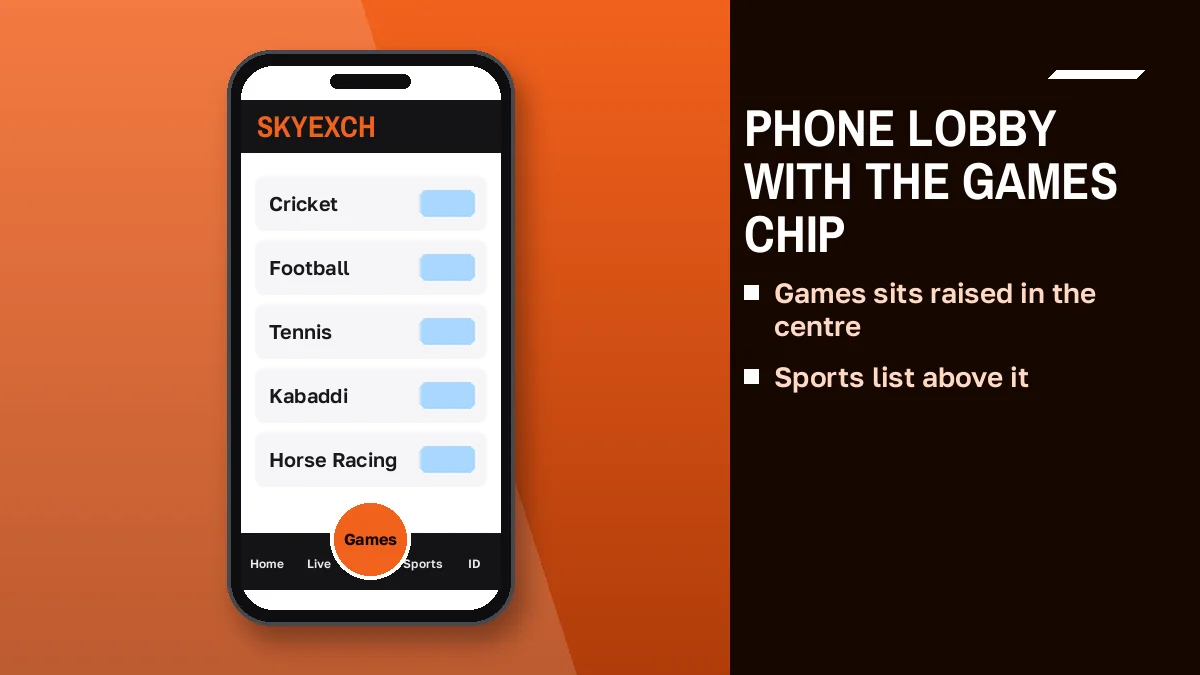
If the bar does not appear at all, you are almost certainly still on the sign-in screen or on a desktop-width view of Sky Exchange; rotate the phone back to portrait or close the desktop-site option in the browser menu and it should come back.

Sky Exchange App Login or Phone Browser: A Quick Comparison
Browser.apk filePick by habit, since the account does not care. A Sky Exchange ID opens through either door, so the only real questions are where your first tap goes each day and how you react when an address goes dark.
| Point | Phone browser | Sky Exchange app login (.apk) |
|---|---|---|
| How you start | Type a working mirror address into Chrome or any browser | Tap the icon after installing the file from the Download .apk button |
| Fields | Username, Password, Validation | Username, Password, Validation |
| Bottom tab bar | Games, Sports, In-Play, Home, Multi Markets, Account | The same six tabs |
| Address blocked by an ISP | Switch to the mirror the ID desk shares that day | Ask the desk whether your build still connects |
| Where the file comes from | Nothing to install | The Download .apk button on the official screen |
The browser is the simpler start. Nothing to install, and if one Sky Exchange address is blocked by your internet provider you just open the mirror the desk names, since Indian ISPs block betting domains and the brand keeps several endings running (.vip, .xyz, .art, .plus, .win among them). The same ID and the same balance open on any of them.
The .apk suits people who log in every day and want an icon on the home screen. Search results show Play Store listings named SkyExch and APK mirror pages; the file that matches the official screen is the one behind its own Download .apk button, so take it from the Sky Exchange address the desk points you to raher than from a page found in search.
Sky Exchange VIP APK and Biz APK searches: a simple explanation
Google pairs the brand with VIP APK and Biz APK because people look for the app through the address ending they already use. VIP and Biz are endings, not editions. Our Sky Exchange VIP ending and its phone app covers the .vip mirror on its own, and the app behind it uses the same three-field login.
Sky Exchange ID Login Mobile: Every Field and Link, Simple Reference
Here is everything on the Sky Exchange sign-in screen as it appears on a phone, top to bottom, with what each item does once your thumb lands on it.
- Username
- The name the ID desk issued in chat. Type it exactly, letter for letter, with no space at the end.
- Password
- Day one: whatever the desk typed in chat. From day two: the one you chose at the change form. Paste it rather than type it, because phone keyboards like to add a space after a word.
- Validation
- On a phone this is the one field where the number pad pops up. Glance at the four digits printed next to it, tap them in, and if you pull down to refresh first, expect a fresh set.
- Login
- Sends the three fields and opens the mobile lobby with the bottom tab bar.
- Demo login
- Skips the three fields altogether. Handy when you only want to see whether the current Sky Exchange mirror opens on your phone before you dig out the desk password.
- Forgot password?
- Small print right under the Password box. Email-registered accounts reset from here; desk and agent IDs go back to the chat that issued them.
- Resend Verification email?
- Only matters if the account was opened with an email address and the first mail went missing. Desk-issued phone IDs rarely touch it, so most people can ignore this line.
- Contact On WhatsApp
- Opens the support chat linked to that Sky Exchange address.
The Sky Exchange ID login on mobile asks for nothing beyond those three fields: no mobile OTP on the screen and no document upload, so a page that asks for anything extra is not the official Sky Exchange screen, and the safest move is to close it and ask the desk for the current address. Any document check happens only inside the desk's own WhatsApp chat.
Sky Exchange Validation Code on a Phone Keyboard: Quick Typing Fixes
The Validation code trips up more phone logins than the password does. It is four digits, printed beside the box, and it is new every time the Sky Exchange screen opens.
Here is how it goes wrong on a phone. The Username goes in, you hop over to WhatsApp for the password, hop back, and the browser has reloaded the tab while it sat in the background. New digits. The ones in your head no longer match, so Sky Exchange refuses a login whose password was perfectly fine.
The fix is boring. Copy the password first, then open Sky Exchange, then fill the three boxes in one go without leaving the browser, and read the code only at the very end.
A few smaller keyboard habits help too:
Tap the Validation box and check which keyboard appears; if the full letter keyboard shows up, switch to the number row before typing, because a stray letter there is easy to miss on a small screen. Watch autocorrect on the Username box as well. Some phones capitalise the first letter on their own, and whether a given mirror treats Sky Exchange usernames as case-sensitive is hard to say, so match the spelling in the desk chat exactly. And if the browser offers to autofill, look at where it drops the saved password; it sometimes lands in the Username box.
Still failing after two careful tries? Reload, take the fresh code, try once more.
Easy Sky Exchange Mobile Login Steps From a Phone Browser
This is the sequence that gives the fewest failed attempts on a phone, written for someone who already holds a Username and Password from the Sky Exchange ID desk.
- Password on the clipboard. Do the WhatsApp part first: copy the desk password, close the chat, and stay out of it until you are inside the Sky Exchange lobby.
- Today's mirror in the address bar. Type the Sky Exchange ending the desk named most recently; if the browser suggests an older ending from your history, ignore it.
- Fill Username. Type it exactly as the chat spells it, and remove any space or capital that autocorrect adds.
- Paste Password. Long-press the Password box and paste; tap the eye icon if your browser shows one, to confirm nothing extra came along.
- Four digits, last of all. Glance at the code only after the first two boxes are full. It belongs to this exact opening of the screen, and a page that refreshes behind your back hands you a fresh one.
- Login, then look down. The first sign it worked sits at the bottom edge of the phone, where the Games chip rises above its five neighbours.
Six short steps. If step two is where you stall, because the address will not open at all, the problem is the domain and not your ID; the error block below and the Sky Exchange login page for every screen both cover what to do next.
Sky Exchange Mobile Login Errors: Quick Fixes Phone Users Need
Wrong codeBlocked addressMost Sky Exchange mobile login failures fall into four groups. Each one has its own quick fix, and none of them needs a new ID.
Sky Exchange address will not open: a quick mirror fix
Indian internet providers block betting domains, so a Sky Exchange address that worked last week can stop opening on mobile data or home Wi-Fi without warning. Your ID is fine. Ask the ID desk for the ending that works today and type that one instead; the same Username, Password and balance carry over to any working mirror.
Sky Exchange rejects the code or password: a safe retry order
Reload the screen, take the fresh 4-digit code, then type all three fields again without leaving the browser. If the password is refused twice in a row, stop guessing. Use Forgot password? under the fields, or message the desk if your ID came from a desk or an agent.
Sky Exchange signs you out after travel: a simple IP note
The Sky Exchange rules say that changing IP across cities often, or running an IP-masking app, may void bets or suspend the account. Sign in from your normal connection and switch any such app off before you open the screen.
Sky Exchange app login stops after an update: a reliable fallback
When the .apk will not reach the sign-in screen, log in through the phone browser on the current mirror instead. Same ID, same tab bar. Then ask the desk whether a newer file is on the official Download .apk button before you reinstall.
Sky Exchange Mobile Login Notes: Trusted Answers for Phone Searches
Sky Exchange mobile login on a phone browser, in short
The Sky Exchange mobile login uses the same three fields as the desktop screen, stacked in one column: Username, Password and the 4-digit Validation code. After the login the lobby opens with the bottom tab bar, Games raised in the middle.
Sky Exchange app login from the official .apk file
A Sky Exchange app login asks for exactly the same details as the browser. Take the file from the Download .apk button on the official screen, not from a mirror page in search results.
VIP APK and Biz APK searches refer to the address ending, not to a different app.
Sky Exchange ID login mobile with a desk-issued Username
For a Sky Exchange ID login on mobile, type the Username exactly as the desk chat spells it, paste the password and read the code last. The first login on a new ID asks you to replace the temporary password.
Sky Exchange mobile reset when the password is lost
Lost the password? On the phone screen the reset link is the small line right below the Password box. A desk or agent ID goes back to that desk chat for a fresh temporary one.
Sky Exchange free Demo login on a small screen
Demo login on the official Sky Exchange screen gives a practice balance with no deposit, and it opens the same mobile lobby so you can learn the tab bar before using a real ID.
Sky Exchange Forgot Password on Mobile: The Safe Reset Route
Lost password, phone in hand. Which route you take depends on who issued the Sky Exchange ID in the first place, and on a small screen it is worth working that out before tapping anything.
If you created the account with an email address, the Forgot password? link under the fields starts a reset from the Sky Exchange screen itself, and Resend Verification email? sits right beside it for the case where the original mail never arrived. Check the spam folder on the phone's mail app too; it is small, but it is often where that message ends up.
Most IDs in India, though, come from an ID desk or an agent, and those are reset by the desk that issued them, in its WhatsApp chat, with a fresh temporary password that you change at the next login exatly as you did on day one, which means the reset on a phone takes the same three fields and one extra screen.
Google pairs the brand with ID password reset and login password change, which tells you how common this is. The how a Sky Exchange login password is changed covers the change screen itself and the rules for a new password; this section stays with the phone side of it.
Free Sky Exchange Demo Login on a Phone Before Your First Real ID
Demo login is the second item under the fields on the Sky Exchange phone screen, and it is the quickest way to see the mobile lobby without an ID at all.
- Where it sits
- Directly under the Login item on the official Sky Exchange sign-in screen, on both the browser and the .apk.
- Cost
- Free. No deposit and no Username needed.
- What you get
- A practice balance on the same mobile lobby, with the six-tab bar along the bottom.
- What it is good for
- Learning where Games, In-Play and Multi Markets sit, and how back and lay prices read, before your first real login.
- What it cannot do
- Nothing won in the demo can be withdrawn, and a demo session has no link to any real Sky Exchange ID.
- Moving on
- When you want a real account, the ID desk issues a Username and a temporary Password in chat.
The practice side of a Sky Exchange demo ID goes further into the practice side. On a phone, the main value of Demo login is plain: you find out where your thumb needs to go on the Sky Exchange tab bar before any real balance is involved, and that alone saves a few nervous taps later.
Sky Exchange First Phone Login With a New ID: Secure Password Change
New IDs behave a little differently on day one. Sky Exchange will not let a temporary password straight through to the lobby. It stops you at a change form first, and on a phone that form appears in the same single column as the login.
- Two lines to the desk. A username you like and the mobile number you will use, nothing more at this point; the Sky Exchange registration page lists the rest.
- Star the reply. The desk answers with a Username and a temporary Password. Long-press that WhatsApp message and star it so you can find it again from the chat list.
- Use the address from that same chat. The Sky Exchange mirror named there is the one to open today; tap-hold to copy it into the browser, or start the .apk if it is already installed.
- Keyboard order matters. Letters for the first two boxes, then the phone flips to digits; tap the four numbers you see in the Validation slot without leaving the page to check WhatsApp again.
- Swap the password. Pick something you have not used on any other betting ID, type it twice on the change form, and only then save.
- Check the bottom edge. Six tabs with the Games chip raised in the middle mean the new ID works on this phone.
Some IDs come through an agent instead of the desk. Agents sit above clients in the Sky Exchange tiers (Super, Master, Sub) and use a separate admin address of their own, which this site never hands out; the Sky Exchange agent page explains those tiers, and your client login on the phone stays the same three fields either way.
Sky Exchange Mobile Login Questions: Quick, Verified Answers
What do I type to sign in to Sky Exchange on my phone?
Three things: the Username the ID desk sent, its Password, and the four Validation digits printed beside the last box at that moment. Do it in a phone browser on the current Sky Exchange mirror or inside the .apk; after Login, the six-tab bar shows along the bottom of the screen.
What is on the Sky Exchange mobile tab bar?
The Sky Exchange mobile tab bar holds six tabs: Games as a raised chip in the centre, plus Sports, In-Play, Home, Multi Markets and Account. It stays fixed at the bottom of the screen after login, so every part of the lobby is one tap away on a phone.
Is the phone browser or the Sky Exchange app better for signing in?
Both work with the same Sky Exchange ID and balance. The browser needs nothing installed and switches easily to a new mirror when an ISP blocks an address. The app suits daily users; take the file only from the Download .apk button on the official screen the desk shares.
Why does the Sky Exchange Validation code fail on my phone?
Usually the screen refreshed while you switched apps, so the Sky Exchange code changed. Copy your password first, then fill all three fields without leaving the browser and type the four digits shown at that moment, using the number keyboard so no stray letter slips into the box.
What if I forget my Sky Exchange password while on my phone?
There are two routes. Accounts opened with an email can use Forgot password? under the Sky Exchange fields. IDs from an ID desk or agent go back to that desk, which sends a temporary password in chat for you to replace at the next login. Never hand a password to a stranger who messages first.
Is there a Sky Exchange Demo login I can open on my phone?
Yes, and no ID is needed for it. Demo login under the three fields on the official Sky Exchange screen hands you a practice balance with no deposit, inside the same phone lobby with the Games chip and bottom tabs. Anything shown there stays practice money and cannot be withdrawn.
- sky exchange mobile login
- skyexch login mobile
- sky exchange app login
- sky exchange id login mobile
- sky exchange mobile se login kaise kare
- skyexch apk login
- sky exchange password bhul gaye
- sky exch demo login phone