
Sky Exchange In Play Sign-In: A Quick Route Straight to Live Markets
6182 The real screen shows a fresh 4-digit code beside this box each time it opens, so if a live market is waiting, copy the code you see and not the one from your last visit.
Live betting on Sky Exchange starts after sign-in, at the In-Play tab; the ID desk issues the username and temporary password that get you there. 18+ only.
Bet while it plays
Sky Exchange In Play: Live In Play Betting on Odds That Move
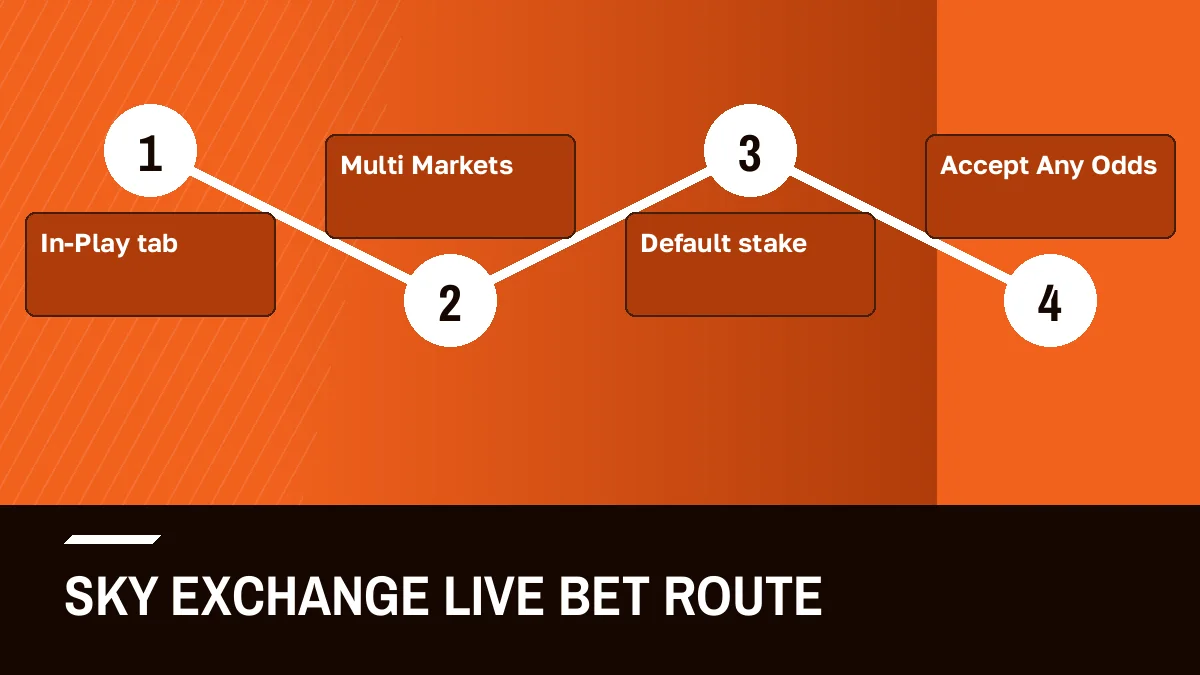
Bet live on Sky Exchange in four moves: sign in, tap In-Play, open a running match, then pin its lines to Multi Markets. Fix your stake amounts in the settings drawer before the toss, since live numbers shift faster than anyone types.
The Sky Exchange In-Play Tab: Live Events Running Right Now
In-Play tabEvents running nowSign in, and the In-Play tab is where live betting begins. On a laptop it sits second in the sports bar, right after Home and just before Multi Markets, in a row that runs on through Cricket, Football, Tennis, Cock Fight, Casino, Sportsbook, Horse race, GreyHound, Binary, Kabaddi, Politics and Basketball. On a phone it lives in the fixed tab bar at the bottom of the Sky Exchange lobby.
What the tab lists is simple. Events that are running now.
That one filter is the whole point. The Cricket tab shows the cricket markets Sky Exchange has open, started or not, while In-Play strips the list down to matches and races already under way, so a searcher who typed skyexch inplay at the eleventh over of a chase does not have to scroll past tomorrow's fixtures to find tonight's.
What changes on a Sky Exchange live market
Prices on a running event move with the game. A wicket, a boundary, a rain break, a sending-off in football: each one shifts what backers and layers will accept, and the numbers on the board follow within moments. Sky Exchange is an exchange, so you can back (bet for) or lay (bet against) on the same market, and both sides keep updating while play goes on.
Some markets also pause. In practice that happens around big moments, and a price you were about to take may simply not be there when you tap. Annoying, yes. Normal on a live exchange, though, and two of the settings further down this page exist mostly for that reason.
Most of the live traffic is cricket, no surprise. Yet the tab has no favourite sport: a tennis set, a football half, a kabaddi raid or a greyhound race all appear while they run, and vanish when they finish. For cricket-only browsing on Sky Exchange, matches that have not started included, our Sky Exchange cricket page has the sport on its own.
Reading a Live Sky Exchange Market: Back, Lay and the Fast Price Move
Open any event from the In-Play list and Sky Exchange shows the match odds board first. Two columns of prices sit beside each runner: the back side and the lay side.
Backing a team means you want it to win. Laying it means you are taking the other side, betting it will not not. On a live market both prices tick, and the gap between them can widen for a few seconds after something big happens on the field before it narrows again.
Above the main board you will see the market tabs: FancyBet, SportsBook and Binary. Each one opens its own list of lines for the same event, and any line from any of the three can be pinned to Multi Markets later, which is where most live users end up anyway.
A short worked case helps. Say a chase is on and the batting side has the back price you like. You tap it, the bet slip opens with that price filled in, you type a stake or tap a Quick Stake, and you confirm. If the price is still there when Sky Exchange tries to match it, the bet shows under Matched bets. If it moved first, the slip either asks again or, with Accept Any Odds switched on, takes whatever the new price is.
That last part matters more than most new users expect.
A price on a live Sky Exchange market is a moving target, which is why the settings drawer, and not the board itself, decides how calm or how hurried your live betting feels; set it once before the match and you stop fighting the slip every over.



Sky Exchange Settings Drawer: Four Quick Controls for Live Bets
On desktop the Setting link sits at the right end of the Sky Exchange sports bar, next to One Click Bet. It opens a drawer with four controls, and every one of them earns its place once odds start to move.
- Default stake
- Whatever INR figure you save here is pre-filled the instant you touch a number, which spares you typing while the bowler is already running in.
- Quick Stakes
- A row of stake buttons you can edit to your own amounts; one tap sets the stake on the slip instead of the default.
- Highlight when odds change
- As the label says, a price that has just moved gets marked on the board, which makes a shifting Sky Exchange market far easier to follow by eye.
- Accept Any Odds
- Lets the slip take the current price if the one you tapped moved before matching; leave it off if you would rather be asked again.
- One Click Bet
- Sits beside Setting in the sports bar; check what it does on your own screen before you switch it on during a fast match.
Which mix suits you is hard to say from outside. Most people who bet live on Sky Exchange set a default stake they are comfortable with, edit the Quick Stakes to three or four amounts, and turn Highlight on. Accept Any Odds is the one to think about, because it trades the comfort of a confirmed price for speed.
Placing a Live Bet on Sky Exchange In Play: Easy Steps from Tab to Slip
Here is the order that works on both the phone and the desktop layout. Sky Exchange keeps the same steps; only the position of the tabs differs.
- Get past the gate early. Three boxes on the Sky Exchange screen: the issued name, the password, and the four digits printed next to the last box, which change every visit. A brand-new desk ID forces a password change on that first entry, so do it well before toss time.
- Set the drawer. Open Setting, fill in a Default stake, edit Quick Stakes and decide on Highlight when odds change and Accept Any Odds before any match starts.
- Open In-Play. Tap In-Play in the sports bar or the bottom tab bar; the list shows only events running now.
- Pick the market. Open the event, then choose the main board or a FancyBet, SportsBook or Binary tab for the line you want.
- Commit and read the book. Hit a number in either column, glance at the pre-typed amount, place it, then watch the bet land under Matched bets while the Sky Exchange Book Position lines shift for each runner.
Step two is the one people skip, then regret. Setting Sky Exchange stakes mid-over, with the price ticking, is exactly when a slip in the amount happens.
Sample Sky Exchange Live Board: How a Fast Market Reads
Sample layoutNot live pricesThe board below is a made-up layout of the kind Sky Exchange draws for a running cricket match. Team names and every number are placeholders; nothing here comes from a real event.
| Runner | Back | Lay | What a mark on the price would mean |
|---|---|---|---|
| Team A | 1.85 | 1.87 | Back price just moved; Highlight flags it |
| Team B | 2.10 | 2.14 | Unchanged since the last ball |
| Draw (Test only) | 12.0 | 13.5 | Wide gap; the market is thin |
Read it left to right. Back is the price you take to bet for a runner; lay is the price you take to bet against it. On the real Sky Exchange board, with Highlight when odds change switched on, the cell that just moved is the one that gets marked.
Why does the third row look so wide? Because few people trade it. A thin market can jump several points on one bet, and on a live match that jump may come at a moment you are not watching, which is where the Highlight setting earns its keep.
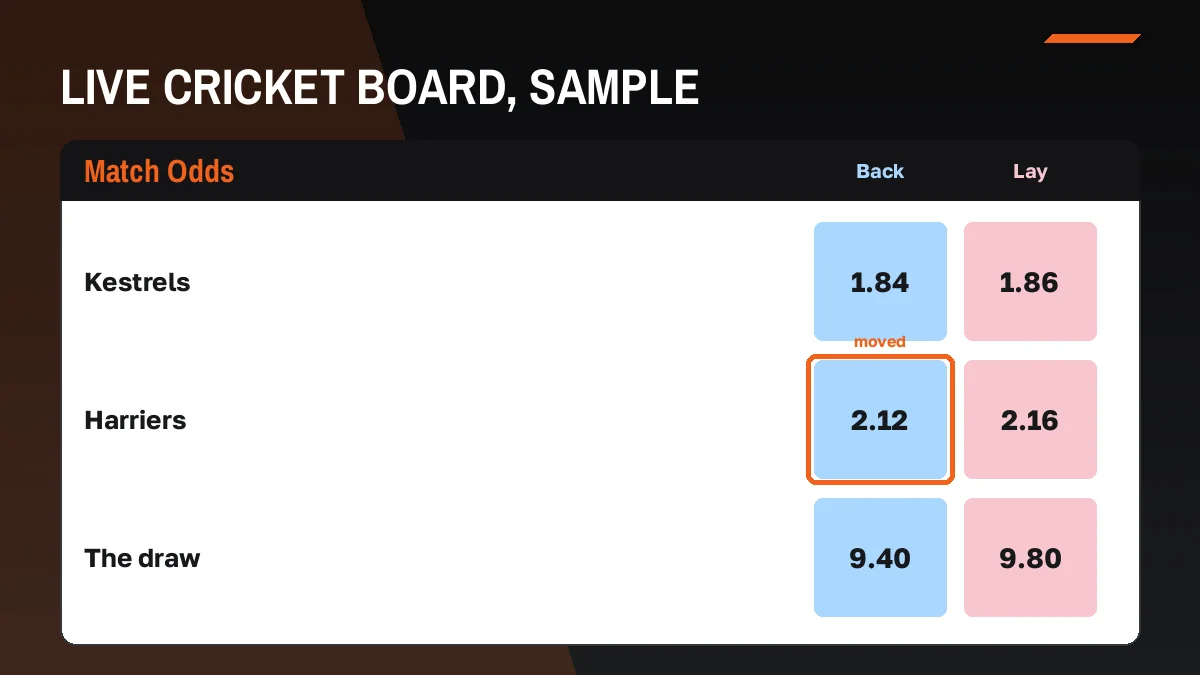
Carry one habit from this mock board to the live Sky Exchange one: watch the thin line. The Draw row above trades rarely, so a single bet can drag it several points, and that is the row where your tap most often misses because the figure moved under your thumb thumb. Highlight spots the jump. Accept Any Odds decides whether your bet chases it.
Sky Exchange Multi Markets: Pin Several Live Markets on One Screen
Third in the desktop sports bar, and a tab of its own on a phone, sits the Sky Exchange screen most live users end up living on. Multi Markets takes whatever you pin, from any event, and stacks it.
Why bother? Live cricket rarely runs on one market. A match odds board, a session line under FancyBet and maybe a SportsBook price on the same game all move on the same ball, and flicking between three tabs means you see each price a few seconds late. Pin all three to Multi Markets and they sit stacked together.
It also works across sports. Two matches running at once, one in cricket and one in tennis, can can share the screen.
A rough routine that people settle into: open In-Play, open the event, pin the markets you care about, then stay on Multi Markets for the rest of the match. The In-Play tab becomes the place you go to find events, and Multi Markets the place you actually bet from. That split, find on one tab and bet on the other, is probably the single habit that makes Sky Exchange in play feel manageable on a phone screen.
Unpin a market when its event ends. A cluttered pin list is the one way this tab gets slower than the board it replaced.
Sky Exchange In Play on Mobile: The Easy Tab Bar Route
On a phone, Sky Exchange swaps the long sports bar for a fixed bottom tab bar. Six items, always visible, and In-Play is one of them.
- Games
- The raised chip in the centre of the bar; it opens the casino side, not the live sports list.
- Sports
- Every sport and every open market, live or not.
- In-Play
- Only events running now; the fastest way into a live Sky Exchange market from any screen.
- Home
- The lobby front page, one tap back from anywhere.
- Multi Markets
- Your pinned markets, stacked on one screen, which on a small display saves a lot of back-and-forth.
- Account
- Settings and details for the ID you signed in with.
In practice the phone route is two taps: In-Play, then the event. Pin from there and switch to Multi Markets. If you would rather use an app than a browser tab, our note on the Sky Exchange apk for phone users covers the Download .apk button found on the official login screen.
On a laptop the same destinations are laid out differently. In-Play and Multi Markets sit in the sports bar across the top, Casino takes the job of the Games chip, and the three login fields (Username, Password, Validation) sit in the header bar with the Login and Demo buttons, so you can sign in without leaving the lobby. One Click Bet and Setting stay at the right end of that bar. Nothing about the live flow changes between the two layouts; only where your thumb or cursor goes. Pick whichever screen you will actually watch the match on, because switching devices halfway through an innings is where people lose track of what they already placed.
Sky Exchange Live In-Play Settings and Spellings, Explained Fast
Sky Exchange in play, read as the running-now filter
Typing sky exchange in play leads to one destination: the running-now list after Home on a laptop, or in the bottom bar on a phone, from where a live market is two taps away.
Skyexch inplay spelling, typed the quick way
Skyexch inplay is the joined spelling people type for the same In-Play tab; the brand also appears as sky exch and skyexchange.
Live Sky Exchange settings to set before the first ball
Four controls sit in the Setting drawer:
- Default stake
- Quick Stakes
- Highlight when odds change
- Accept Any Odds
Fast order for a live Sky Exchange bet
The sequence that keeps the slip calm:
- Sign in with the 4-digit Validation code
- Open In-Play and pick the event
- Pin markets to Multi Markets
- Tap a back or lay price and confirm
Sky Exchange Multi Markets for easy live tracking
Multi Markets pins several markets, across sports if needed, onto one screen so prices on the same ball show together.
Safe live play on Sky Exchange from one steady connection
Watching the last overs on a train between two cities, on mobile data that keeps changing towers, is the kind of hop the Sky Exchange rulebook links to voided bets.
Sky Exchange In Play Troubleshooting: Quick Fixes Mid-Match
Live fixesFour snags, and the Sky Exchange fix for each.
- The match is not in In-Play. It may not have started yet; look under Sports or Cricket.
- Tapped, but nothing matched. In the second between tap and confirm, a boundary went and the figure shifted. Touch the fresh one, or let Accept Any Odds absorb such jumps.
- Open Bets says Place bet to see it here. Nothing went through on that market.
- The address died mid-match. Blocks hit addresses, not accounts. Sign in on another Sky Exchange mirror the desk names and the same ID shows the same balance.
Switching between home Wi-Fi and data in another city, mid-match, is covered under the Sky Exchange void-bet and IP rules.
Sky Exchange Bet Slip During Live Play: Real Terms Explained
The Sky Exchange slip is small, and its labels are terse. These four matter most once a Sky Exchange market is live.
- Matched bets
- Bets the exchange has paired with another user at your price.
- Book Position
- How each outcome of the market would land for you, across every bet you hold on it.
- Open Bets
- Shows Place bet to see it here when there is nothing on that market.
- Casino coin
- Between overs in the casino, 1 casino coin counts as 100 INR of main balance.
Check Book Position after every few live Sky Exchange bets. Quickest sanity check there is.
A Verified Sky Exchange ID Before the Match Goes Live
Sort the ID out hours before the toss, not during the powerplay. A Sky Exchange account here comes from a WhatsApp chat, and the forced password change on first entry plus setting the drawer eat a few minutes you will not want to spend once the In-Play list is already full of moving prices. State law decides whether live betting is allowed where you are, and some Indian states ban it, so that check sits with you too. Request details, step by step, are on our Sky Exchange ID page.
No ID yet and a match on tonight? Press Demo login on the official Sky Exchange screen, take the practice balance, and rehearse the route above (the running list, pinning, the drawer) without depositing anything.
Sky Exchange In Play Questions: Quick Live Betting Answers
What does In-Play mean on Sky Exchange?
It is the running-now filter. Anything already under way on Sky Exchange, a chase, a tennis set, a kabaddi half, shows in In-Play, and matches still waiting to start do not. Desktop users find it right after Home in the sports bar; phone users find it in the bottom tab bar.
What does Multi Markets do on Sky Exchange?
It turns separate Sky Exchange markets into one stacked screen. Picture the fifteenth over: match odds, a FancyBet session line and a tennis set elsewhere, all ticking at once. Pin each from its event page and all three update together, so you stop flicking between tabs and missing moves.
What does Highlight when odds change do on Sky Exchange?
It marks a price on the board that has just moved, as its name suggests. You switch it on in the Sky Exchange settings drawer. On a live market where prices shift after every ball, the mark helps your eye catch the change before you tap an old number.
How do I set a default stake for live bets on Sky Exchange?
Open the Setting drawer and type an amount into Default stake. On desktop the Setting link sits at the right end of the Sky Exchange sports bar. After that, tapping any price fills the bet slip with that stake, so you are not typing amounts while a live market is moving.
What are Quick Stakes on Sky Exchange?
Think of them as preset amount buttons you write yourself. In the Sky Exchange Setting drawer you replace each value with a figure you actually bet, and on the slip a single press swaps that figure in over your default stake. Handy when the over is halfway done and the number is twitching.
Where is In-Play on the Sky Exchange phone screen?
It lives in the fixed bar along the bottom edge of the Sky Exchange lobby on a phone, sharing it with Games, Sports, Home, Multi Markets and Account. That bar stays put on every screen, so the running list is one tap away even mid-scroll; open a match and pin its lines from there.
Should I use Accept Any Odds for live Sky Exchange markets?
Use it only if speed matters more to you than a fixed price. With Accept Any Odds on, Sky Exchange takes the current price when the one you tapped moved before matching. With it off, the slip asks again, which is slower but keeps you in control.
Can changing my IP affect live bets on Sky Exchange?
Yes, it can. Per the Sky Exchange rules, a VPN or an IP that keeps jumping between cities may cost you voided bets or a suspended account. Before a long chase, settle on one connection, home broadband or one phone network, and stay on it until the last ball.
- sky exchange in play
- skyexch inplay
- sky exch live betting
- skyexchange in play cricket
- sky exchange multi markets
- sky exchange live odds
- skyexch in play kaise kare
- sky exchange default stake
- sky exchange live match bet
- skyexch inplay app